Most teams start this conversation as if it were a technical question, but I don’t think that’s the right place to start.
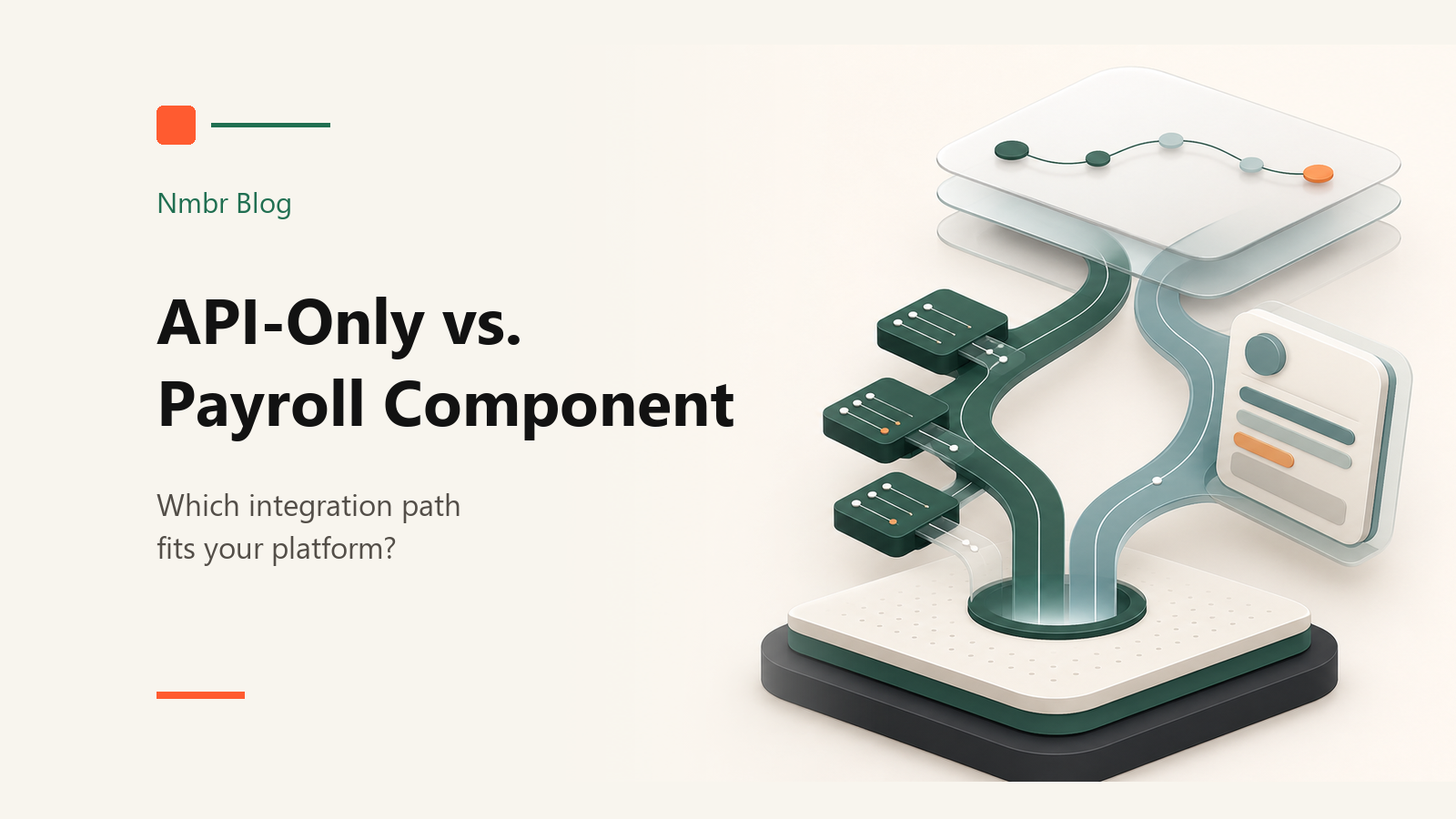
What’s the difference between API-only and the component?
API-only means your team builds the front-end payroll experience itself, while Nmbr powers the underlying infrastructure.
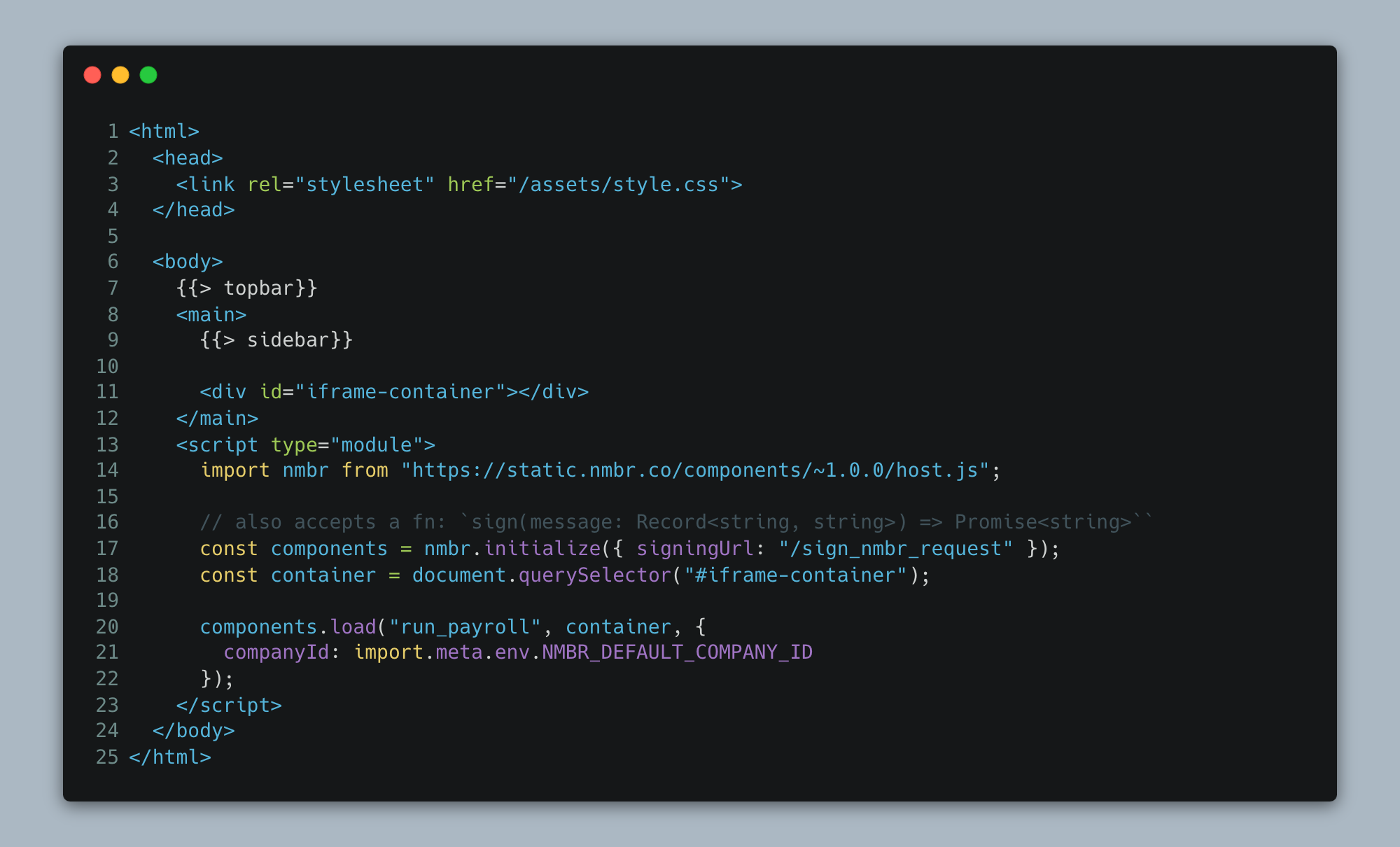
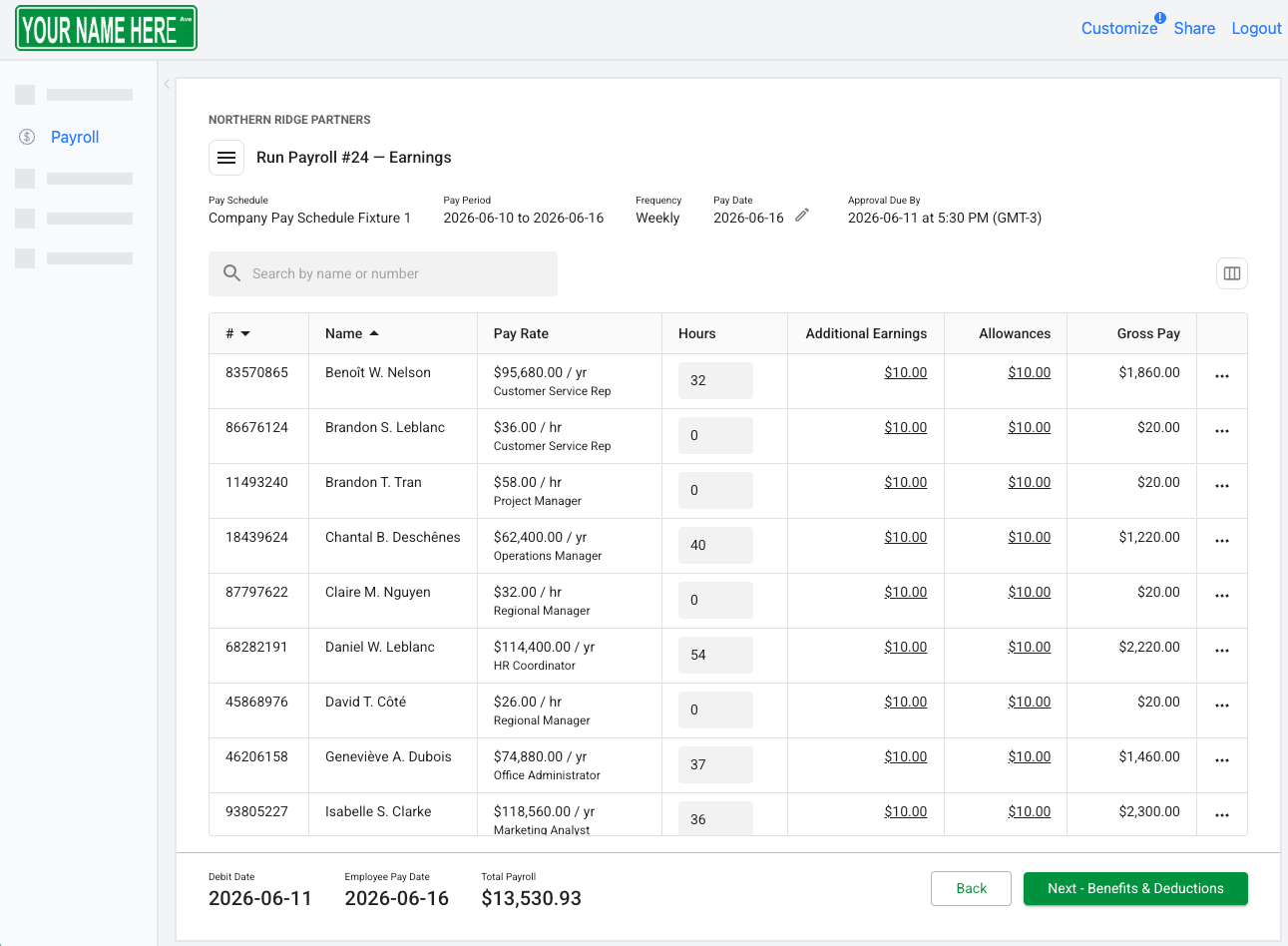
The component is a prebuilt payroll front-end experience that you can embed in your platform. Pay runs, reports, forms, TD1s, payroll settings, employee payroll details, and other core pieces are already in place. You can customize the fonts, colours, and branding, put it behind a Payroll tab, and have a real payroll product in the market much faster than if you build the whole thing from scratch.
I usually describe it as embedding Stripe, but for payroll.
The fast version is: create a Payroll tab, embed the component, match the branding, and you have a working payroll experience inside your product. The important caveat is that this is not the whole integration - it’s just the front-end.
What does a drop in embedded payroll component look like?
In practice, the component turns a payroll tab like this:
Into a working payroll experience like this:
Today, we work with 30+ partners, including platforms with very large distribution. I mention this because our clients who are component only run into demos where their prospects say, “Your payroll screens look a lot like so and so’s.”
It’s not a terrible thing, because we spent years engineering the component to be best-in-class from a functional and user-experience standpoint. Still, nobody wants their product to feel interchangeable.
That is where resources and expertise come in.
If your team has never built payroll before, be honest about the lift. Can you design the pay run, reports, forms, setup flows, exceptions, and payroll-specific screens well enough that a real payroll admin trusts it?
Most partners should start with the component. Not because API-only is wrong. It just asks more of your team than people usually expect. Not just in terms of time and resources, but in terms of the stakes.
That’s the honest answer.
Why did Nmbr build the payroll component?
When we started Nmbr, we were API-only. That meant we provided the backend infrastructure: the tax engine, money movement, partner portal, compliance workflows, and the API layer partners needed to build a custom payroll experience on top of us.
Our partners were responsible for building the entire front-end, from the pay run screens to the fillable TD1 forms and reporting.
And honestly, a lot of teams struggled. Not because they were bad teams. Because payroll has a lot in it.
Our component has roughly 87 screens, everything from the payroll home page to the summary screen. That is a lot of product decisions before you even get into the API work. It’s a lot to get right, especially when deciding what belongs in version one and what can wait.
We had partners skip benefits screens because they served industries where benefits seemed uncommon. Then they would get into a demo, and someone would ask where benefit deductions were configured … that’s not a great time to realize an assumption was wrong.
As an embedded payroll provider, we win when partners actually bring payroll clients onto the platform. We help with product strategy, engineering support, positioning, sales and client experience training, and more - all to help you launch and scale a successful payroll business. But none of that matters if the product a customer sees on demo day feels incomplete.
And when your team has to design that many screens, the launch takes longer.
There are two risks: building the wrong thing and taking too long to learn that you built the wrong thing.
Do you have the time, resources, and payroll expertise to build it properly? If not, start with the component, get feedback from real clients, and decide what is worth customizing later.
The partners that went API-only had a real reason to do it. They had strong product and engineering cultures, a clear view of their customer, and a brand where a third-party front end would have felt out of place. They were product and engineering cultures built around owning the details. For them, using a third-party UI wasn’t congruent with their brand or what their customers know them for. They had the conviction and methodologies to do it right, and now they have payroll products that are very hard to compete with in their verticals.
“Whoa,” you might think. “What they built is better than your component?”
Yes.
Not because their front-end does more than the component. In fact, it does a lot less. As above, our component has 87 screens. That’s a lot, but we built it to accommodate nearly every use case.
On the other hand, for our API-only clients, all of whom are in vertical SaaS, they built it with their customer avatar in mind. If you serve restaurants and the payroll experience speaks the language of restaurants, that matters. Same for construction, healthcare, hospitality, or any other vertical where payroll has its industry-specific pain points. That’s why they have such a high payroll attach rate: their workflows were clearly built around how the industries they serve run.
But payroll front-end work is not just making screens. You need to understand the nuances of payroll, where risk shows up, what payroll admins actually do, which workflows matter, and what needs to be there on day one versus later. You also need the design resources to make the product feel trustworthy. Payroll is not the place where people want to feel like they are using a half-finished product.
If we use the component, are we finished with the integration?
No. This is probably the most important thing to understand.
The component gives you the front-end payroll experience. It does not make payroll valuable inside your product by itself.
If a customer logs in to your payroll screen and finds no employees, pay rates, hours worked, employee banking details, or business information, you haven’t added much value. You have placed payroll next to your product and given it a separate place to enter data.
The API integration is required either way.
The difference is that, with the component, the integration focuses more on data mapping.
What payroll data do you already have? What are you missing? Which system should own each field?
That is where the component gives you optionality. Maybe your platform already stores employee profiles, hours, rates, departments, and locations. Push that into payroll. If you don’t store tax jurisdiction or other payroll-specific fields yet, let the component collect those for now.
You don’t need to rebuild your whole product around payroll on day one. But you do need to take payroll seriously enough that the data flow works, the ownership is clear, and customers are not re-entering the same information in two places.
Why do most partners start with the component?
Everything above matters, but the simplest reason is that they want to launch.
A lot of API-first projects can look like progress for a long time. The team is connecting endpoints, mapping data, working through edge cases, handling authentication, and making technical decisions. All of that matters.
But then six months later, someone asks, “Can I see it?” And the answer is still basically no.
Proof of concept matters. You need something people can see. Even if it is just a coworker clicking through it at first, that changes the conversation.
Sales can sell it. Product can test it. Leadership can understand the investment. Customers can tell you what is actually useful.
To this day, most of our partners use the component for some or all of their payroll experience. Some use it because they want to launch quickly. Some use it to learn before customizing. Then they get into market, customers use it, and the conclusion is basically: “This is solid.” Maybe a prospect notices that the payroll screens look familiar. Obviously that’s not ideal, but it’s a much smaller problem than spending a year rebuilding a workflow customers are already happy using.
When should you go API-only?
API-only makes sense when you have a real reason to own the payroll experience, not just a preference. A major factor in that is your level of in-house payroll knowledge.
If your team already knows payroll, understands your customers, has strong product leadership, and has design and front-end resources, then API-only can be the right call. It will take longer, but if you go all-in, you can end up with a better product because you know what you are trying to build, why it matters, and where your product needs to be different.
There are partners where this is obvious. They have been around payroll for years. They have used every payroll system. They know what feels janky. They know where the current process breaks for their clients. They are not guessing from scratch.
In that case, building more of the experience yourself can make sense.
The other reason is differentiation. If payroll is central to your product strategy, you may not want a standard workflow. A construction platform, for example, might need pay run screens that show job costing, unions, shift differentials, seasonal ROE workflows, or other details a generic payroll screen would not handle well. If that workflow is one of the reasons customers buy your product, you probably want to own more of it.
But if you are choosing API-only because it feels cleaner or more flexible, I would be careful.
Flexibility is great when you know what you want to do with it. But if you are going API-only to learn payroll from scratch, that can get expensive fast. That’s because you are not just building screens - you are making product decisions in a domain with a lot of edge cases.
How should timing affect the decision?
Timing changes the answer because payroll launches are usually slower than people expect. A typical launch might look like this:
- Pilot: 1–3 clients for 30–60 days
- Phase 2: 5–10 clients for another 30–60 days
- General availability: Once support, implementation, and product are ready for more volume
During the initial phases, you are collecting client feedback, iterating on processes, and preparing for general availability. Even when you get to GA, depending on your resources, you may not have the implementation and support capacity to take on a wave of clients (unless you are leaning on your embedded partner, which we’ll discuss in another post).
In other words, payroll is usually a slow roll. You may want to build the perfect API-first product, but if you want to reach general availability this year, an API-only approach may not fit the timeline.
When it comes to timing, we suggest working backward from the goal. If the goal is to launch fast, get out there, sell, and test the market, the component is usually the recommendation. If the goal is to build a great payroll product and you have the time and the team, API-only can make sense.
Neither path is automatically better. They solve different problems. You just need to be honest about which one you are optimizing for.
Can you use both the component and the API?
Yes. In practice, this is where most integrations end up. Start with the component, then use the API where your product has a real reason to be different (e.g. the construction ROE example mentioned earlier).
You can start with the component, do a deep backend integration, launch a pilot, collect feedback, iterate, launch the next group, and keep learning. As you learn, you can decide which parts of the front end are worth owning yourself.
Maybe you own employee onboarding. Maybe you own benefits assignment. Maybe you own reporting. Maybe you own the pay run prep because your platform has context the component doesn’t.
You can take on those pieces and turn off the related actions in the component.
What about security with the iFrame?
For banks, large platforms, and enterprise partners, the iFrame question comes up quickly.
It should. Payroll has sensitive data in it. Names, addresses, SINs, banking details, employee records, and the information needed to move money. If you are embedding payroll inside your platform, your security team should care about where the component is loaded from, how the user is authorized, where the data is stored, and what control your platform keeps over the flow.
The important thing is that the component does not have to work like a random third-party script being pulled into your product with no control. For more locked-down partners, the component can be packaged and hosted by the partner rather than loaded directly from our CDN. In that model, the payroll experience still lives inside your platform, but the bundle is served from your environment. That matters for teams that do not want a third-party component loading remotely every time the page opens.
The iFrame is still part of how the component works. It keeps the payroll experience contained, avoids conflicts with your platform’s front-end code, and lets the payroll-specific experience evolve without your team having to rebuild every screen. But from the user’s perspective, payroll is still inside your platform. It is not a vendor link pretending to be embedded payroll.
Authentication works the same way. Your platform authenticates the user. Your platform decides whether that user is allowed to make the request. Then a short-lived signed token is attached to the request so Nmbr can validate that it came from you, has not been modified, and is still current.
That distinction matters because we are not asking to own your customer session. We are validating requests that your platform has already authorized.
For some partners, API calls can also go through a partner-controlled proxy. That gives the partner more observability and control. They can see what is flowing through, apply their own patterns, and in stricter environments, it gives them a circuit breaker: if something looks wrong, they can cut off the connection from their side. Not every partner needs that, but for banks and enterprise platforms, it can be part of the architecture.
On the data side, Nmbr holds the information required to run payroll, but it can be structured so the partner keeps ownership and control. For large organizations, that can include options like dedicated tenancy, partner-controlled keys, and Canadian data residency. The exact setup depends on the partner’s requirements, but the point is that there are patterns for making this work in more sensitive environments.
So which integration path should you choose?
If you have payroll knowledge, strong product and design resources, and a real reason to own the full experience, API-only can make sense. If you need speed now and control later, start with the component and move to a hybrid solution over time.
If you want the practical path, start with the component and go hybrid over time. That is what I would recommend for most platforms. Launch something real. Integrate the data properly. Watch what customers do. Then decide what is worth owning.
The mistake is treating API-only as the serious option and the component as the shortcut.
Sometimes API-only is the serious option. Sometimes it is just the slower option.
The component gets you to market. The API lets you go deeper. The right answer depends on what you are actually trying to do: launch payroll, learn payroll, or build payroll into a core part of your product.